
 EN
EN
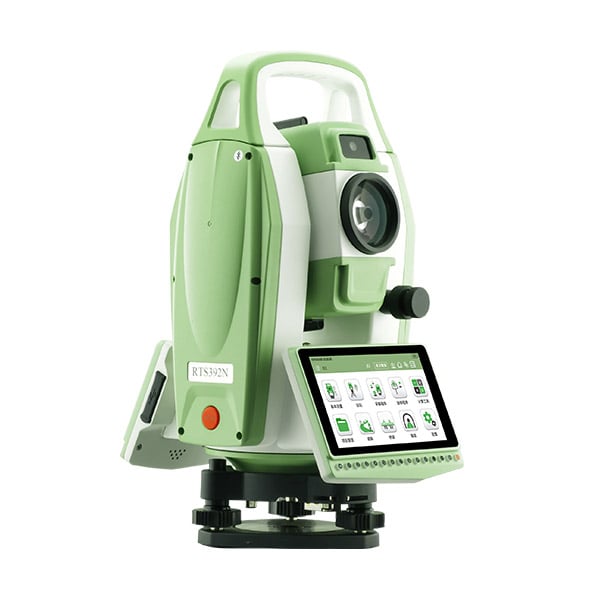
Selecting the right android total station is one of the most consequential equipment decisions a surveying team can make. Unlike conventional instruments, an android total station combines the precision of a traditional optical and electronic measurement device with the flexibility of a modern Android operating system, enabling field teams to run third-party apps, sync data in real time, and streamline workflows that once required multiple devices. With so many models and configurations available today, understanding exactly what to evaluate before purchasing is essential to making a sound investment.
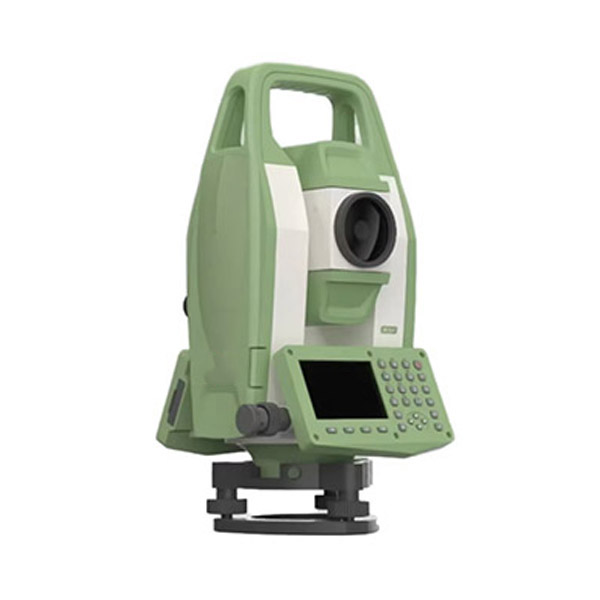
The decision involves far more than comparing price tags or angular accuracy specifications. A well-chosen android total station should align with your project types, field conditions, software ecosystem, and long-term operational goals. This guide walks through the critical selection criteria that experienced surveyors, engineers, and project managers rely on when evaluating an android total station for professional use.
Understanding the Role of the Android Platform in a Total Station
Why the Operating System Matters for Field Productivity
The integration of the Android operating system into a total station fundamentally changes how field data is collected, processed, and transmitted. An android total station allows operators to install surveying applications directly on the instrument, eliminating the need for a separate data collector or controller. This consolidation reduces equipment weight, simplifies the field kit, and shortens the learning curve for crews already familiar with Android-based devices.
Beyond convenience, the Android platform enables real-time connectivity. An android total station can push measurements directly to cloud storage, communicate with BIM platforms, or sync with office software while the survey is still in progress. For construction and infrastructure projects where data latency creates costly rework, this capability has measurable operational value.
When evaluating an android total station, confirm which Android version the instrument runs and whether the manufacturer commits to OS updates. Older Android versions may not support current app releases, which can limit your software options over the instrument's service life.
App Compatibility and Software Ecosystem
Not all android total station models support the same application environment. Some instruments are locked to proprietary software suites, while others allow open installation of third-party surveying apps from the Google Play Store or via sideloading. Understanding this distinction is critical before committing to a platform.
Evaluate whether the android total station you are considering is compatible with the field software your team already uses. If your workflow depends on a specific data collection app, road design module, or stakeout program, verify compatibility directly with the manufacturer before purchase. Switching software mid-project introduces retraining costs and data format complications that are entirely avoidable.
Also consider the availability of software updates and technical support for the apps running on the android total station. A robust software ecosystem with active developer support extends the useful life of the instrument and protects your investment.
Measurement Performance and Accuracy Specifications
Angular and Distance Accuracy Requirements
The core function of any android total station remains precise angle and distance measurement. When reviewing specifications, pay close attention to angular accuracy, expressed in arc-seconds, and distance measurement accuracy, typically stated in millimeters plus a parts-per-million component. These figures directly determine whether the instrument is suitable for your project tolerances.
For control surveys, cadastral work, or high-precision engineering layouts, an android total station with angular accuracy of 1 to 2 arc-seconds is generally required. For topographic surveys, site grading, or general construction layout, instruments in the 3 to 5 arc-second range are often sufficient and typically more cost-effective. Matching accuracy class to project requirements avoids overspending on precision you do not need.
Distance measurement range is equally important. Confirm the reflectorless range of the android total station, particularly if your work involves measuring to surfaces where prism placement is impractical. Reflectorless ranges vary significantly between models, and selecting an instrument with insufficient range for your typical targets will create field inefficiencies.
Compensator Type and Environmental Robustness
A dual-axis compensator is a standard expectation in any professional android total station. It automatically corrects for instrument tilt in both the horizontal and vertical planes, which is essential for maintaining accuracy on uneven terrain or when the instrument is disturbed during measurement. Single-axis compensators only correct in one plane and are generally not suitable for demanding survey applications.
Environmental durability is another specification that deserves careful attention. An android total station used in construction, mining, or outdoor infrastructure work will be exposed to dust, moisture, vibration, and temperature extremes. Look for instruments rated to IP54 or higher for dust and water resistance. Operating temperature range is also relevant if your projects occur in cold climates or desert environments where temperatures fall outside the typical range.
Battery life under real field conditions, not just manufacturer-stated maximums, should also factor into your evaluation. An android total station running Android apps, wireless connectivity, and continuous EDM will consume power faster than a conventional instrument. Confirm whether the battery is user-replaceable in the field and whether spare batteries are readily available.
Connectivity, Data Management, and Integration
Wireless and Communication Capabilities
Modern field workflows increasingly depend on seamless data flow between the instrument, the office, and project management platforms. An android total station should offer robust wireless connectivity options, including Wi-Fi, Bluetooth, and ideally cellular data capability through a built-in SIM card slot. These features determine how efficiently your team can transfer data, receive updated design files, and communicate with project stakeholders.
Bluetooth connectivity is particularly useful for pairing the android total station with external GNSS receivers, enabling integrated GNSS and total station workflows on a single platform. This combination is valuable for projects where control points need to be established quickly without a separate GPS unit.
Evaluate the USB and memory options as well. An android total station with expandable storage via microSD and standard USB ports provides flexibility for data backup and file transfer in environments where wireless connectivity is unreliable or restricted.
Data Format Compatibility and Office Integration
The value of field data collected by an android total station depends heavily on how easily it integrates with office software. Confirm that the instrument and its associated software can export data in formats compatible with your CAD, GIS, or project management platforms. Common formats include DXF, CSV, LandXML, and proprietary formats used by major surveying software suites.
Some android total station platforms offer direct cloud synchronization, allowing field measurements to appear in the office system within minutes of collection. This capability is particularly valuable on fast-moving construction projects where design changes and as-built verification happen concurrently. Evaluate whether the cloud integration is native to the instrument or requires a third-party middleware solution.
Data security is also worth considering, especially on government or infrastructure projects with strict data handling requirements. Understand where field data is stored, who has access to it, and whether the android total station platform complies with relevant data protection standards.
Ergonomics, Usability, and Field Practicality
Display Quality and User Interface Design
An android total station is only as productive as its operator can make it under real field conditions. The touchscreen display must be readable in direct sunlight, which is a common failure point for instruments with insufficient screen brightness. Look for displays with high nit ratings and anti-glare coatings designed specifically for outdoor use.
The user interface should be intuitive for both experienced surveyors and newer crew members. An android total station with a well-designed interface reduces training time and minimizes input errors during fast-paced stakeout or data collection tasks. If possible, request a hands-on demonstration or trial period before finalizing your selection.
Physical controls, including hard keys for critical functions, remain important even on a touchscreen-based android total station. Gloved operation is common in cold weather or on industrial sites, and a device that relies entirely on touchscreen input becomes difficult to use in those conditions. Confirm that essential functions remain accessible via physical buttons.
Weight, Balance, and Transport Considerations
Field crews carry equipment across varied terrain, often for extended periods. The weight and balance of an android total station affect operator fatigue, setup speed, and the risk of handling damage. Compare instrument weights carefully, particularly if your team works on steep slopes, in confined spaces, or on projects requiring frequent instrument moves.
Tribrach compatibility and the quality of the instrument's leveling system also influence setup efficiency. An android total station with a reliable automatic leveling system and clear circular bubble reduces setup time on each station, which compounds into significant time savings over a full project.
Consider the carrying case and transport accessories as well. A well-designed case protects the android total station during vehicle transport and storage, reducing the risk of calibration drift caused by physical shock. Some manufacturers offer modular case systems that accommodate accessories alongside the instrument, which simplifies logistics on multi-day field assignments.
Support, Calibration, and Total Cost of Ownership
Manufacturer Support and Service Network
An android total station represents a significant capital investment, and the quality of after-sales support directly affects the return on that investment. Evaluate the manufacturer's service network in your region, including the availability of authorized repair centers, typical turnaround times for calibration and repair, and the availability of loaner instruments during service periods.
Calibration is a recurring requirement for any android total station used in professional surveying. Confirm the recommended calibration interval and the cost of factory calibration versus field calibration procedures. Instruments that support comprehensive field calibration routines reduce downtime and travel costs associated with sending the unit to a service center.
Warranty terms vary considerably between manufacturers. A longer warranty period with clear coverage terms for both hardware and software components provides meaningful protection for a high-value instrument. Read the warranty carefully to understand what is and is not covered, particularly for damage caused by environmental exposure or operator error.
Long-Term Value and Upgrade Path
The total cost of ownership for an android total station extends well beyond the purchase price. Factor in the cost of software licenses, annual maintenance agreements, accessory purchases, and eventual calibration or repair expenses. An instrument with a lower upfront price but high ongoing software costs may prove more expensive over a five-year ownership period than a higher-priced alternative with inclusive software.
Consider the manufacturer's track record for firmware and software updates. An android total station that receives regular updates gains new features, improved performance, and extended compatibility with evolving field software platforms. Manufacturers who abandon software support shortly after product launch leave users with instruments that become progressively less capable relative to the market.
Finally, assess the resale value and market demand for the android total station model you are considering. Instruments from manufacturers with strong market presence tend to retain value better, which matters if your organization upgrades equipment on a regular cycle.
FAQ
What makes an android total station different from a conventional total station?
An android total station runs the Android operating system on the instrument itself, allowing users to install and run surveying applications directly on the device without a separate data collector. This integration simplifies the field kit, enables real-time data connectivity, and allows access to a broader range of software tools compared to instruments running proprietary embedded operating systems.
Is an android total station suitable for high-precision control surveys?
Yes, provided you select a model with the appropriate angular and distance accuracy specifications. An android total station is available in accuracy classes ranging from 1 arc-second for high-precision work to 5 arc-seconds for general construction layout. The Android platform does not inherently limit measurement precision; the optical and electronic measurement components determine accuracy independently of the operating system.
How important is software compatibility when choosing an android total station?
Software compatibility is critically important. The value of an android total station depends significantly on the applications it can run and how well those applications integrate with your existing office and project management workflows. Before purchasing, verify that the instrument supports your preferred field software, confirm the Android version and update policy, and evaluate the manufacturer's software ecosystem for long-term viability.
What environmental protection rating should an android total station have for construction site use?
For active construction site use, an android total station should carry a minimum IP54 rating, which provides protection against dust ingress and water splashing from any direction. Projects in particularly harsh environments, such as mining, coastal construction, or heavy rainfall regions, may benefit from instruments rated IP65 or higher. Always verify the operating temperature range as well, especially for projects in extreme climates.
Table of Contents
- Understanding the Role of the Android Platform in a Total Station
- Measurement Performance and Accuracy Specifications
- Connectivity, Data Management, and Integration
- Ergonomics, Usability, and Field Practicality
- Support, Calibration, and Total Cost of Ownership
-
FAQ
- What makes an android total station different from a conventional total station?
- Is an android total station suitable for high-precision control surveys?
- How important is software compatibility when choosing an android total station?
- What environmental protection rating should an android total station have for construction site use?