
 EN
EN
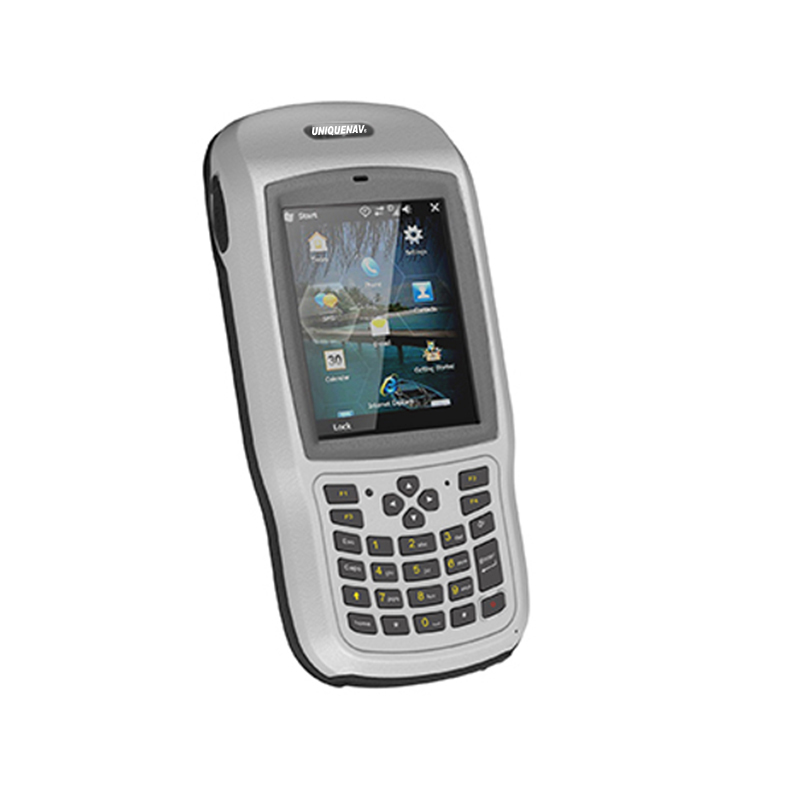
A GIS data collector is one of the most demanding tools in the field professional's arsenal. Unlike office equipment that operates in controlled environments, a GIS data collector is routinely exposed to dust, moisture, extreme temperatures, physical impact, and prolonged outdoor use. Keeping this device functional and accurate under such conditions is not a matter of luck — it requires a disciplined, systematic maintenance approach that addresses both the hardware and the software components of the unit.
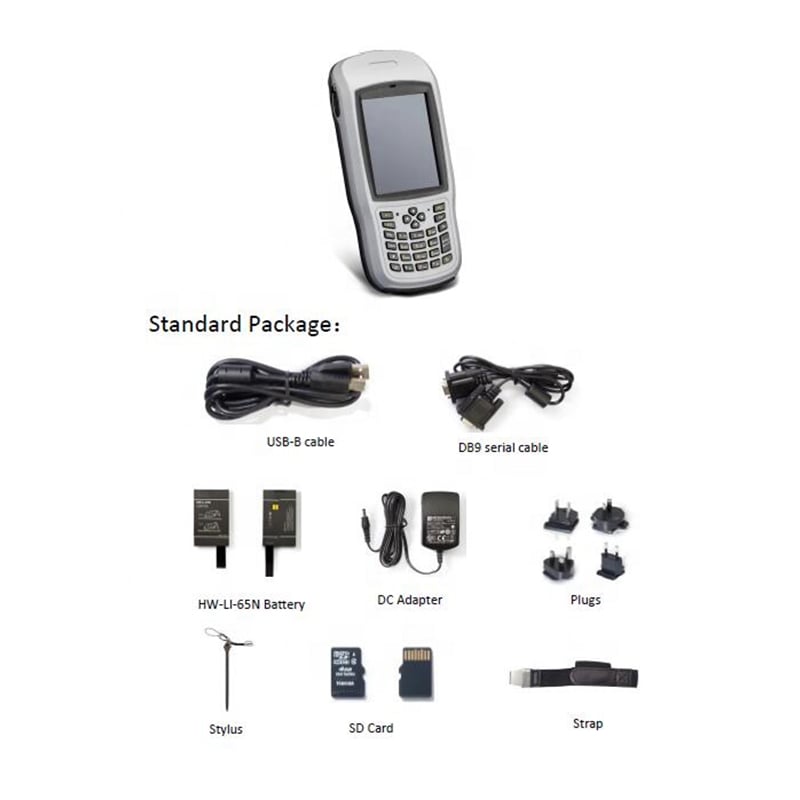
Understanding how to maintain a GIS data collector in harsh conditions is essential for surveyors, utility mappers, environmental scientists, and infrastructure professionals who depend on precise geospatial data. Neglecting routine maintenance can compromise data accuracy, shorten device lifespan, trigger costly repairs, and delay critical fieldwork. This guide walks through the practical steps, precautions, and protocols needed to protect your GIS data collector and keep it performing at its highest level in the most demanding environments.
Understanding the Environmental Threats to a GIS Data Collector
Physical and Mechanical Stress
Field environments are inherently unpredictable. A GIS data collector may be dropped on rocky terrain, bumped against machinery, or subjected to vibrations during vehicle transport. Physical shock is one of the leading causes of internal hardware damage, including cracked circuit boards, dislodged battery connectors, and damaged antenna modules. Recognizing these mechanical stressors is the first step in designing a proper maintenance routine.
Even devices rated for rugged use benefit from the protection of a quality carry case during transport. When a GIS data collector is not actively in use, securing it in a padded, hard-shell case reduces the risk of incidental damage. Field teams should establish clear equipment handling protocols to prevent careless drops or impacts that could subtly compromise device integrity without triggering obvious symptoms.
Routine visual inspections after each deployment are highly recommended. Check the housing, ports, display screen, and antenna connections for any cracks, dents, or loosened components. Catching minor physical damage early prevents it from escalating into more serious internal faults that are far more expensive to repair.
Moisture, Dust, and Contamination
Water and dust infiltration are among the most persistent threats to any GIS data collector used outdoors. Even devices with strong IP ratings can develop vulnerability over time as seals and gaskets degrade with repeated use and exposure. Moisture inside a device causes corrosion on connectors, short circuits, and battery degradation, all of which erode both performance and service life.
After working in wet or muddy conditions, the GIS data collector should be wiped down thoroughly with a dry, lint-free cloth before storage. Pay particular attention to charging ports, data ports, and any cover seals. Leaving moisture trapped inside port covers accelerates seal deterioration and creates pathways for water ingress during future deployments.
Dust and fine particles are equally problematic, particularly in desert, construction, or mining environments. Particles that accumulate in ventilation gaps, connectors, or under screen protectors can cause overheating, connector failure, or touchscreen malfunction. A periodic cleaning routine using dry compressed air and soft brushes is a practical and low-cost way to prevent these issues from developing.
Battery Management for a GIS Data Collector in Extreme Conditions
Temperature Effects on Battery Performance
Battery performance is highly sensitive to temperature extremes, and this is one of the most underappreciated maintenance concerns for any GIS data collector deployed in harsh environments. In cold climates, lithium-ion batteries can lose a significant portion of their effective capacity, causing unexpected shutdowns during critical data collection tasks. In hot environments, batteries degrade faster and may even pose safety risks if overheated.
When operating a GIS data collector in cold conditions, keeping the device warm by storing it close to your body before deployment can help preserve battery charge. In hot environments, avoid leaving the device in direct sunlight or inside a closed vehicle. Heat stress from prolonged exposure to high ambient temperatures accelerates battery aging even when the device is powered off.
Always allow the battery to reach a moderate ambient temperature before charging after it has been exposed to extreme cold. Charging a very cold battery can cause lithium plating, a form of internal damage that permanently reduces battery capacity. Following proper temperature-aware charging protocols extends battery lifespan and maintains reliable power supply during fieldwork.
Long-Term Battery Health Practices
For a GIS data collector that is used intensively on multi-day field campaigns, battery health management is a continuous practice rather than an occasional concern. Avoiding deep discharge cycles — where the battery is allowed to drop to near zero before recharging — is one of the most effective ways to extend battery life. Keeping the charge level between 20% and 80% during active use preserves cell integrity over hundreds of charge cycles.
If a GIS data collector will be stored for an extended period without use, the battery should be charged to approximately 50% before storage. Storing a fully charged or fully depleted battery for weeks or months causes accelerated electrochemical degradation. Checking and topping up the charge every few weeks during prolonged storage periods is a simple habit that significantly extends overall battery health.
Carry at least one spare battery when working in remote locations where recharging infrastructure is unavailable. Rotating between two batteries during long field sessions not only ensures continuous operation but also distributes the charge cycle load evenly, which is beneficial for the long-term health of both cells.
Protecting the Display and Input Systems
Screen Maintenance in Field Conditions
The touchscreen is one of the most frequently damaged components of a GIS data collector. In harsh conditions, screens face abrasion from sand and grit, impacts from drops, and UV degradation from extended sun exposure. Applying a high-quality tempered glass screen protector is a straightforward and cost-effective measure that absorbs impact energy and prevents surface scratches from affecting touch sensitivity.
Cleaning the screen regularly with a microfiber cloth and, when necessary, a screen-safe cleaning solution prevents the buildup of grime, sunscreen residue, and mineral deposits from water splashes. These residues, if left untreated, can etch into screen coatings over time and reduce both readability and touch responsiveness. In bright sunlight conditions, adjusting screen brightness settings carefully helps avoid thermal stress from maximum brightness operation over extended periods.
If the GIS data collector must be operated while wearing gloves — a common requirement in cold or hazardous environments — verify that the device supports glove-mode touch input. Attempting to operate a non-glove-compatible touchscreen with gloves causes unnecessary pressure and physical stress on the screen assembly, increasing the risk of damage.
Button, Port, and Connector Care
Physical buttons, charging ports, USB connectors, and antenna attachment points are all vulnerable to debris accumulation and corrosion in field conditions. Inspecting these elements regularly as part of a GIS data collector maintenance routine catches issues before they become critical failures. Loose antenna connectors are a particularly common cause of GPS signal degradation that is often misdiagnosed as a software or firmware issue.
Port covers and protective flaps must be kept securely closed whenever the corresponding port is not in use. These covers are designed to maintain the device's ingress protection rating, and leaving them open — even briefly — during rain or dusty conditions creates direct exposure pathways. Replacing worn or cracked port covers promptly is essential, as a compromised cover provides far less protection than manufacturers' IP ratings suggest.
Applying a thin layer of dielectric grease to metal connector contacts in environments with high humidity can help prevent oxidation. This is particularly relevant for the charging port and any external data connectors that are used frequently. Clean the contacts gently with a dry cotton swab before applying grease to ensure the protective layer adheres to clean metal surfaces.
Software, Firmware, and Data Integrity Maintenance
Keeping Firmware and Software Updated
Physical maintenance of a GIS data collector is only half the equation. The software environment running on the device must also be kept in optimal condition. Firmware updates released by device manufacturers often include GPS engine improvements, battery management enhancements, and security patches that directly affect performance and reliability in field conditions. Scheduling regular firmware update checks is a practice that pays dividends in accuracy and stability.
Field data collection software should similarly be kept updated, as newer versions often include bug fixes, improved coordinate system support, and better integration with cloud data platforms. Outdated software can create data format incompatibilities, processing errors, and synchronization failures that compromise the value of field-collected data long after it has been gathered.
Before a major field deployment, always verify that both the firmware and field software are current and that the device has been tested with the updated versions. Rolling out an untested firmware update immediately before a critical project introduces avoidable risk. Plan updates during equipment maintenance windows between projects, not in the field.
Data Backup and Storage Health
Data integrity is as much a part of GIS data collector maintenance as hardware care. Establishing a reliable data backup protocol ensures that even if a device is lost, damaged, or has a storage failure, collected data is recoverable. Configure automatic synchronization to cloud storage or a field server whenever network connectivity is available, and perform manual backups at the end of each field day.
Internal storage and SD card health should be monitored periodically. Reformatting storage media according to manufacturer recommendations prevents file system errors from accumulating over time. A GIS data collector that stores data on a corrupted or fragmented card may experience slower write speeds, data loss, or device instability — problems that can be entirely avoided with routine storage hygiene.
Always verify that collected data has been successfully transferred and validated before clearing storage in the field. A simple data verification step at the end of each session — checking that file counts, sizes, and coordinate values match expected ranges — catches collection errors while the context is still fresh and corrective resurveys are still feasible.
Establishing a Preventive Maintenance Schedule
Daily and Weekly Maintenance Habits
The most resilient approach to maintaining a GIS data collector in harsh conditions is building preventive habits rather than reacting to failures. A daily post-field routine should include cleaning the exterior, checking all port covers and seals, backing up collected data, and charging the battery appropriately. These actions take only minutes but collectively eliminate the majority of field-preventable failures.
Weekly checks should include a more thorough inspection of the screen condition, antenna connectors, and any accessories such as styluses, carry cases, or external GNSS modules. Testing the device's GPS lock acquisition speed and positional accuracy against a known reference point confirms that the GIS data collector is maintaining its specified performance levels and alerts you to any emerging calibration or hardware issues.
Document maintenance activities and any observed anomalies in a simple equipment log. This record becomes invaluable when diagnosing intermittent issues, planning part replacements, or making procurement decisions for replacement devices. A well-maintained log also supports warranty claims and demonstrates professional equipment stewardship in regulated industries.
Periodic Deep Maintenance and Professional Servicing
Beyond daily and weekly routines, a GIS data collector should receive deeper inspection and servicing at regular intervals depending on the intensity of use. Devices used daily in extreme environments benefit from professional inspection every six to twelve months. This service should include a full hardware diagnostic, seal and gasket integrity check, battery capacity test, and firmware audit.
During periods of particularly intensive use — extended field campaigns, disaster response operations, or utility corridor surveys — consider increasing inspection frequency to monthly. High-stress operational periods accelerate wear on both mechanical and electronic components, and catching degradation early keeps overall maintenance costs manageable and device uptime high.
When a GIS data collector shows persistent unexplained accuracy issues, extended startup times, or abnormal battery drain, these are signals that professional servicing is needed rather than continued field deployment. Using a degraded device risks compromising an entire project's data quality, which represents a far greater cost than the service visit itself.
FAQ
How often should I clean my GIS data collector after field use?
Ideally, a GIS data collector should be cleaned after every field session in harsh conditions. Wipe down the exterior with a dry or lightly damp cloth, check all port covers, and clear any debris from connectors and seals. In particularly dusty or muddy environments, a more thorough cleaning using compressed air and soft brushes is recommended before storage.
Can I use my GIS data collector in rain without additional protection?
Most modern GIS data collector models carry IP65 or higher ingress protection ratings, which means they can withstand water jets and rain exposure. However, IP ratings are validated under test conditions and can degrade over time as seals age. Always inspect seals and port covers before wet-weather deployments and avoid submerging the device unless it carries a specific submersion rating such as IP67 or IP68.
What is the best way to store a GIS data collector when not in use for extended periods?
Store the GIS data collector in a clean, dry environment away from direct sunlight and extreme temperatures. Charge the battery to approximately 50% before long-term storage, and check the charge level every few weeks to prevent deep discharge. Keep the device in its carry case with desiccant packs if humidity is a concern in your storage environment.
How do I know if my GIS data collector needs professional servicing versus routine maintenance?
If your GIS data collector shows symptoms such as persistent GPS accuracy degradation, unusual battery drain that is not resolved by reconditioning, unresponsive touchscreen areas, charging failures, or repeated software crashes, these are indicators that professional servicing is required. Routine maintenance addresses surface-level wear and software hygiene, while internal hardware faults, seal replacements, and component-level repairs require trained service technicians with appropriate diagnostic tools.
Table of Contents
- Understanding the Environmental Threats to a GIS Data Collector
- Battery Management for a GIS Data Collector in Extreme Conditions
- Protecting the Display and Input Systems
- Software, Firmware, and Data Integrity Maintenance
- Establishing a Preventive Maintenance Schedule
-
FAQ
- How often should I clean my GIS data collector after field use?
- Can I use my GIS data collector in rain without additional protection?
- What is the best way to store a GIS data collector when not in use for extended periods?
- How do I know if my GIS data collector needs professional servicing versus routine maintenance?